
Spot instance details - General info
Overview
This page provides information about the Spot instance, including the provider, operating system, compute configuration, storage, and network.
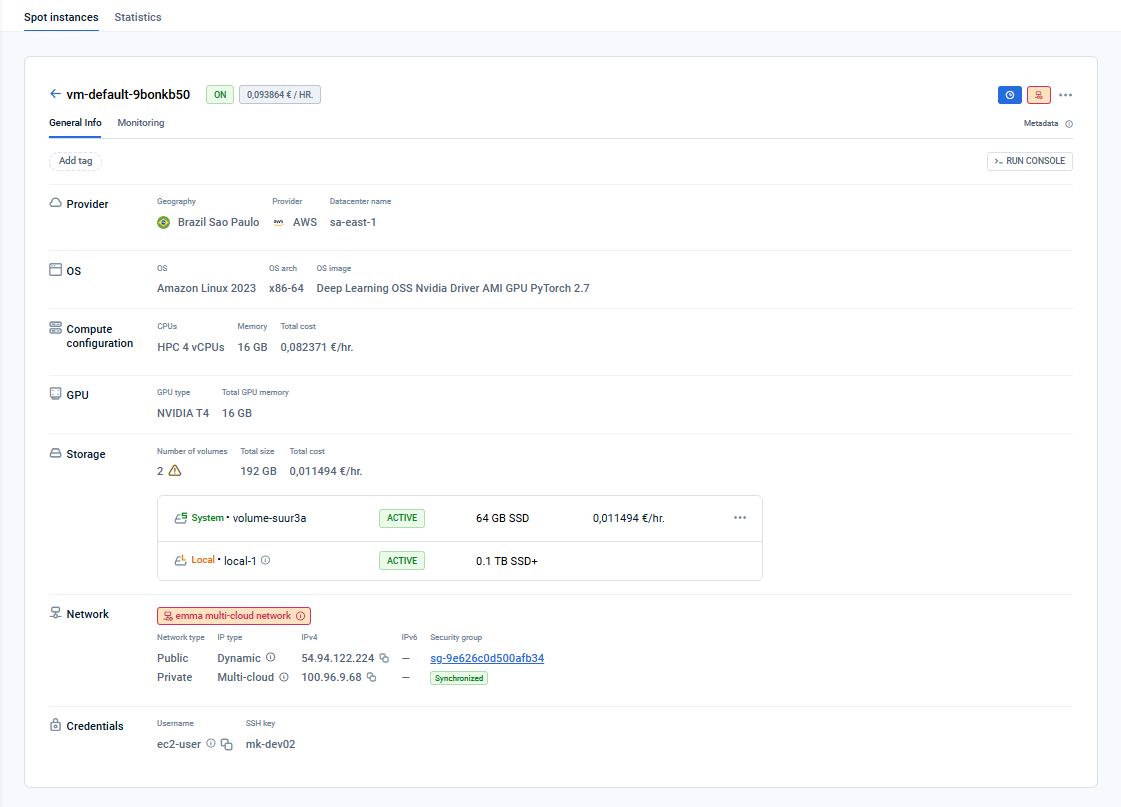
Information on this page
This page provides detailed information about the Spot instances, covering the following categories of Spot instance attributes:
- Provider – Information about the provider name, server geographical location, and provider data center name.
- OS – Details about the operating system (e.g., “Ubuntu”) and the OS architecture (e.g., “x86-64”).
- Compute configuration – Information about the number of virtual CPU cores, memory (vRAM), storage size, and storage type. It is not possible to upgrade or downgrade the Spot instance configuration.
- GPU - GPU type and total GPU memory in GB (for GPU spot instances only).
- Storage – Information about the storage volume type and size.
- Network – Displays network type of the Spot instance (possible options are "emma multi-cloud network", "Isolated instance", and "Provider's default network"). Provides the IPv4 addresses for both public and private Spot instance networks. It also includes a hyperlink to the security group and indicates whether the security group is synchronized with the provider’s network inbound and outbound rules. The security group hyperlink will open a page displaying the security group’s network rules, both inbound and outbound, which can be edited.
- Workflow Execution - block appears for spot instances that were created with a workflow. This block provides the following information:
- Workflow name — The name of the workflow that was executed after spot instance creation. If the workflow still exists, the name is a clickable link that navigates to the workflow detail page, otherwise only the name is displayed (no link)
- Workflow version — The name of the version that was active at deployment time (for example,
v7orMySQL-8.0.35). This binding is fixed for the lifetime of the spot instance: even if the workflow's active version changes later, this instance's record continues to point at the exact version it was deployed from. - Execution Status — The current status of the workflow execution, updated in real time:
- Pending — The instance is still being created; the workflow is waiting for it to be ready to run the script
- Running — The workflow script is currently executing on the instance
- Success — The script has completed successfully
- Failed — The script execution has failed
Actions you can perform on this page
Actions you can perform on a spot instance via the Ellipsis menu:
- Start: Use it to power the Spot instance on. This action is allowed only for instances with the status “OFF”.
- Shutdown: Use it to power the Spot instance off. This action is only allowed for instances with the “ON” and “PREEMPTED” statuses.
- Reboot: This action restarts your Spot instance.
- Change price (applicable only for AWS and Azure): You can adjust the price of a Spot instance in the “OFF” or “PREEMPTED” statuses to improve its chances of being powered on. This action is supported only for AWS and Azure providers.
- Rename: Allows changing the name of the spot instance. Applicable in all statuses except "FAILED".
- Delete: Use this action to delete your Spot instance permanently. Please note that all associated data will be removed upon confirmation of the request.
Actions you can perform in the “Workflow Execution” block:
- Open the source workflow version: Click the version name to open the View version page, where you can view the script, parameters, and content that shipped with this spot instance. See Workflow versions. If the workflow or its version have been deleted, the version name is shown as plain text (no link) and the tooltip reads “Workflow version was deleted”.
How is this guide?
Last updated on 20 Aug 2026